Revive Real Estate - Construction Dashboard

\ Overview

Revive is a real estate renovation platform that helps homeowners maximize the value of their homes before selling. By managing renovations from planning through construction, Revive enables homeowners to increase resale value without paying upfront.

The Construction Dashboard serves as the central workspace connecting homeowners, agents, contractors, and internal project managers throughout the renovation process. It provides a shared place to track project progress, communicate with stakeholders, review documents, sign contracts, and stay informed throughout construction.

As the lead product designer for this initiative, I was responsible for redesigning the entire Construction Dashboard experience across desktop, tablet, and mobile.

The project began with stakeholder interviews, product audits, competitive research, and usability analysis to identify pain points in the existing experience. To accelerate early exploration, I leveraged Claude Design to rapidly generate interactive concepts and facilitate discussions with cross-functional teams, allowing us to align on product direction before moving into high-fidelity design in Figma.

Revive is a real estate renovation platform that helps homeowners maximize the value of their homes before selling. By managing renovations from planning through construction, Revive enables homeowners to increase resale value without paying upfront.

The Construction Dashboard serves as the central workspace connecting homeowners, agents, contractors, and internal project managers throughout the renovation process. It provides a shared place to track project progress, communicate with stakeholders, review documents, sign contracts, and stay informed throughout construction.

As the lead product designer for this initiative, I was responsible for redesigning the entire Construction Dashboard experience across desktop, tablet, and mobile.

The project began with stakeholder interviews, product audits, competitive research, and usability analysis to identify pain points in the existing experience. To accelerate early exploration, I leveraged Claude Design to rapidly generate interactive concepts and facilitate discussions with cross-functional teams, allowing us to align on product direction before moving into high-fidelity design in Figma.

Company

Company

Revive Real Estate

Revive Real Estate

Role

Role

Product Designer

Product Designer

Date

Date

April. 2026 - July. 2026

April. 2026 - July. 2026

\ Current Dashboard

Before redesigning the Construction Dashboard, I conducted stakeholder interviews, usability reviews, competitive analysis, and an audit of the existing product to understand how homeowners, agents, and contractors interacted with the platform throughout a renovation project.

The research revealed that the dashboard had gradually evolved feature by feature without a cohesive information architecture. While it provided access to project updates, documents, photos, and communication tools, users often struggled to build a clear understanding of the overall project. Agents found it difficult to quickly summarize renovation progress for clients, Weekly Updates felt disconnected from the broader project journey, and several sections had become increasingly difficult to navigate as new features were added.

These insights suggested that improving individual screens would not be enough. The experience needed a clearer project overview and a more structured information architecture that better reflected the renovation lifecycle. This became the foundation for the redesign, starting with a new Summary experience and extending to every major section of the dashboard.

Before redesigning the Construction Dashboard, I conducted stakeholder interviews, usability reviews, competitive analysis, and an audit of the existing product to understand how homeowners, agents, and contractors interacted with the platform throughout a renovation project.

The research revealed that the dashboard had gradually evolved feature by feature without a cohesive information architecture. While it provided access to project updates, documents, photos, and communication tools, users often struggled to build a clear understanding of the overall project. Agents found it difficult to quickly summarize renovation progress for clients, Weekly Updates felt disconnected from the broader project journey, and several sections had become increasingly difficult to navigate as new features were added.

These insights suggested that improving individual screens would not be enough. The experience needed a clearer project overview and a more structured information architecture that better reflected the renovation lifecycle. This became the foundation for the redesign, starting with a new Summary experience and extending to every major section of the dashboard.

\ Dashboard Redesign

Rather than treating each feature as an isolated improvement, the redesign reimagined the dashboard as a unified workspace for every stage of a renovation project. A new Summary tab was introduced to give agents an at-a-glance overview of completed work and AI-generated renovation summaries, while the existing tabs were reorganized to improve clarity, navigation, and project visibility. Weekly Updates evolved into a continuous Timeline that better communicated project progress, and Project Scope, Photos, Team, and other sections were restructured with a more consistent information hierarchy and interaction model.

Rather than treating each feature as an isolated improvement, the redesign reimagined the dashboard as a unified workspace for every stage of a renovation project. A new Summary tab was introduced to give agents an at-a-glance overview of completed work and AI-generated renovation summaries, while the existing tabs were reorganized to improve clarity, navigation, and project visibility. Weekly Updates evolved into a continuous Timeline that better communicated project progress, and Project Scope, Photos, Team, and other sections were restructured with a more consistent information hierarchy and interaction model.

\ PRE-CONSTRUCTION EXPERIENCE

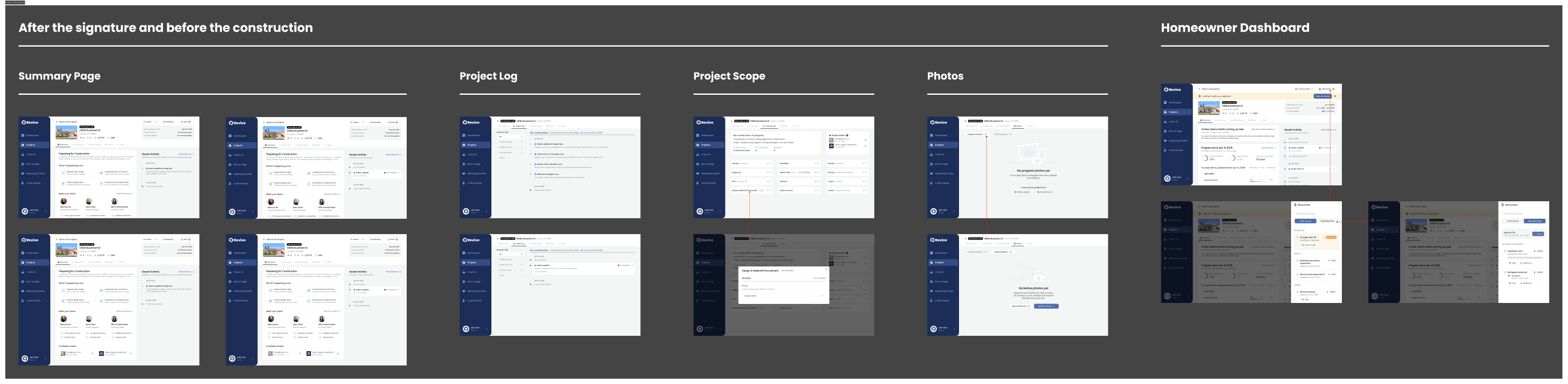
The original dashboard was designed primarily for active construction, leaving a gap between contract signing and the start of renovation. During this period, users encountered numerous empty states, making projects appear inactive even though substantial preparation was happening behind the scenes.

To address this, I designed a dedicated pre-construction experience that communicates ongoing progress while construction has not yet begun.

The redesign introduced tailored empty states, milestone messaging, contextual guidance, and preparation-related information to reassure homeowners that the project was actively moving forward. Rather than presenting an unfinished dashboard, the interface now reflects the unique needs of this transitional project phase.

The original dashboard was designed primarily for active construction, leaving a gap between contract signing and the start of renovation. During this period, users encountered numerous empty states, making projects appear inactive even though substantial preparation was happening behind the scenes.

To address this, I designed a dedicated pre-construction experience that communicates ongoing progress while construction has not yet begun.

The redesign introduced tailored empty states, milestone messaging, contextual guidance, and preparation-related information to reassure homeowners that the project was actively moving forward. Rather than presenting an unfinished dashboard, the interface now reflects the unique needs of this transitional project phase.

\ FINAL DELIVERABLES

The project concluded with a comprehensive design system and engineering handoff that transformed early concepts into production-ready deliverables. Every experience—from the pre-construction phase to project completion—was fully documented across desktop, tablet, and mobile, with responsive behaviors, reusable components, interaction details, and implementation guidance carefully specified in Figma.

Rather than focusing only on ideal user flows, the final designs accounted for edge cases, transitional states, and real-world scenarios, ensuring the product remained consistent, scalable, and ready for development.

The project concluded with a comprehensive design system and engineering handoff that transformed early concepts into production-ready deliverables. Every experience—from the pre-construction phase to project completion—was fully documented across desktop, tablet, and mobile, with responsive behaviors, reusable components, interaction details, and implementation guidance carefully specified in Figma.

Rather than focusing only on ideal user flows, the final designs accounted for edge cases, transitional states, and real-world scenarios, ensuring the product remained consistent, scalable, and ready for development.